thanostool
PDF Merger
Combine Multiple PDFs into One File for Free in 2 sec
PDF MERGER
Welcome to ThanosTool’s PDF Merger, your ultimate online tool to merge PDF files effortlessly. Whether you're combining reports, invoices, eBooks, or documents, our PDF merging tool offers a fast, secure, and seamless way to join multiple PDF pages into one single file—all without installing software.
With our PDF merger, you can merge PDFs in seconds, maintain original formatting, reorder pages, and download the unified file instantly. No signup, no ads, no fuss. Perfect for students, professionals, businesses, and anyone working with documents daily.
pdf merger , Combine Multiple PDFs into One File for FreeWhy Use a PDF Merger ?
1. Simplify Document Management
When you have many separate PDF files, it can get messy to organize, share, and archive them. A PDF merger helps you consolidate multiple files into one, making file handling and sharing cleaner.
2. Streamline Collaboration & Sharing
Sending one unified PDF instead of multiple attachments makes life easier for you and your recipients. It avoids confusion, reduces email bloat, and ensures content is delivered in the correct order.
3. Maintain Formatting & Quality
A good online PDF merging tool preserves fonts, images, layout, and resolution. The merged document looks exactly as if created that way from the start — no layout shifts or missing elements.
4. No Software Installation, Works Across Devices
Because it’s web-based, our PDF merger tool works on Windows, macOS, Linux, iOS, Android — as long as you have a browser. You don’t need to install any software or plugin.
5. Fast, Secure, and Private
We process your files quickly with optimized algorithms, and we don’t store your uploads permanently. After you download the merged PDF, your originals are deleted from our servers for your privacy.
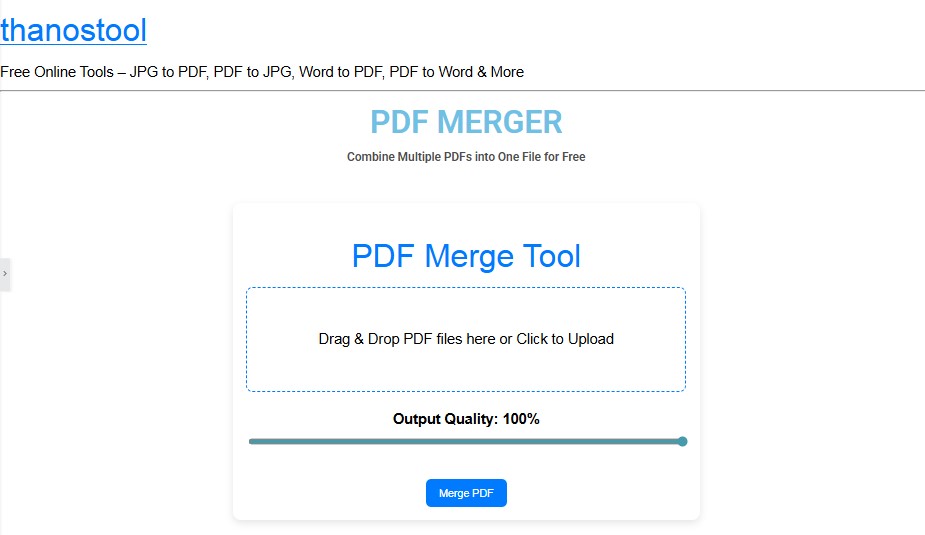
Upload PDFs — Click on “Choose Files” or drag-and-drop multiple PDF files into the upload area.
-
Reorder Pages — After upload, drag the files (and even individual pages) to arrange the sequence in which you want them merged.
-
Merge / Combine — Click “Merge PDF” or “Combine Files” to start the process.
-
Download — Once processing is done, click “Download” to get your unified PDF file.
-
(Optional) Preview & Check — You can scroll through the merged file to confirm all pages are in correct order.
Upload PDFs — Click on “Choose Files” or drag-and-drop multiple PDF files into the upload area.
Reorder Pages — After upload, drag the files (and even individual pages) to arrange the sequence in which you want them merged.
Merge / Combine — Click “Merge PDF” or “Combine Files” to start the process.
Download — Once processing is done, click “Download” to get your unified PDF file.
(Optional) Preview & Check — You can scroll through the merged file to confirm all pages are in correct order.
Tip: Try to upload PDFs of moderate size (for example under 20 MB each) to ensure speedy merging. For very large files, break them or merge in parts.
SEO / Keyword Focus
In creating this content, we’ve carefully included high-volume, relevant keywords such as:
-
PDF merger
-
merge PDF online
-
combine PDFs
-
free PDF merger
-
online PDF merge tool
-
merge multiple PDF files
-
PDF merge without software
-
secure PDF merger
-
PDF file combiner
These keywords are naturally integrated into headings and body text to help search engines understand the purpose of the page and improve ranking for users searching PDF merging tools.
FAQs — Frequently Asked Questions
Q. Is it really free to merge PDFs?
Add YourAbsolutely. We delete all uploaded and processed files shortly after the merge. We do not store or access your content beyond processing. Text Here
Q. Are my files safe?
We support merging multiple PDF files in one session, though extremely large files or very high page counts may be limited for performance reasons. If you have very large PDFs, consider splitting them or merging in smaller batches.
Q. Are there limits on file size or number of PDFs?
Yes — you can drag and drop individual PDFs or pages to adjust the order before initiating the merge.
thanostool is proudly powered by WordPress